FSL Player Attributes
Complete Guide to the Spider Chart Review System
Franchise Star League - Player Performance Assessment
1. System Overview
The FSL Player Attributes Voting System is a peer-reviewed assessment tool that allows qualified reviewers to evaluate player performance across six core attributes. This system creates comprehensive spider charts that visualize player strengths and weaknesses based on actual match performance.
- Secure Access: Each reviewer receives a unique URL token
- Weighted Voting: Different reviewers may have different vote weights
- Match-Based Assessment: Votes are tied to specific matches
- Six Core Attributes: Comprehensive player evaluation
- Progress Tracking: See which matches you've already voted on
- Public Spider Charts: View results in our public spider chart viewer
- 5-10 Scoring Scale: Balanced scoring system with no zero scores
How It Works
- Administrators create reviewer accounts and assign unique tokens
- Reviewers receive their personal voting URL
- Reviewers watch matches and score players on six attributes
- Scores are aggregated and weighted to create spider charts
- Results are displayed in interactive visualizations
- Public spider chart viewer allows anyone to explore the data
Accessing Results
Once voting is complete and scores are aggregated, you can view the results in several ways:
Public Spider Chart Viewer
Visit the "Spider Charts" link in the main FSL menu to access our public spider chart viewer. This tool is available to everyone and provides:
- Player search with autocomplete
- Individual spider charts with detailed statistics
- Division-based player rankings
- Voting activity and reviewer information
Admin Dashboard
Administrators and authorized users can access the spider chart admin dashboard for:
- Managing reviewers and permissions
- Viewing voting activity and statistics
- Running score aggregation scripts
- Analyzing player performance data
2. Why We Use the "Data Science" Method of Voting
To get the clearest picture of a player's strength going into a tournament, we use what we call the Data Science Method of voting: breaking things down match by match, and even attribute by attribute — and letting voters choose Player A, Player B, or "Tie/Unsure" for each item. This method might seem more detailed than a single yes/no vote, but it's exactly this structure that gives us accuracy, fairness, and insight.
Why It Works
Precision Through Simplicity
Instead of forcing a big judgment call ("Who's better overall?"), this method lets us focus on one matchup or one skill area at a time. It's much easier to say, for example, "Player A has better ZvZ" than to rank them in general.
Reduces Bias
We avoid the usual traps of favoritism or reputation. Voters don't have to commit to one player being "the best" overall — just give their honest input in small, manageable pieces.
"Tie/Unsure" is a Strength, Not a Weakness
Not sure who's better in PvT? That's okay! Selecting "Tie/Unsure" tells us that this area isn't clear — and that uncertainty is valuable data. It means we're not forcing guesses, which makes the final picture more honest.
The Power of Crowds
As more people vote, the system gets smarter. Each voter brings a bit of signal — and when aggregated across many matchups and categories, patterns emerge that no single voter could produce alone. We don't need everyone to be an expert on every player. We just need people to focus on what they do know.
In data science, this is known as distributed judgment. When many people independently answer smaller questions, the overall result often outperforms expert consensus or single-score ratings.
- This method breaks down complexity into bite-sized decisions.
- It gives us richer and more balanced insight than broad rankings.
- It improves with every new voter, even if they don't vote on everything.
- It respects uncertainty, rather than guessing through it.
This isn't just a voting system — it's a community-powered scouting report. And the more people contribute, the stronger and clearer the picture becomes.
3. Getting Started
An administrator will provide you with a unique voting URL that looks like this:
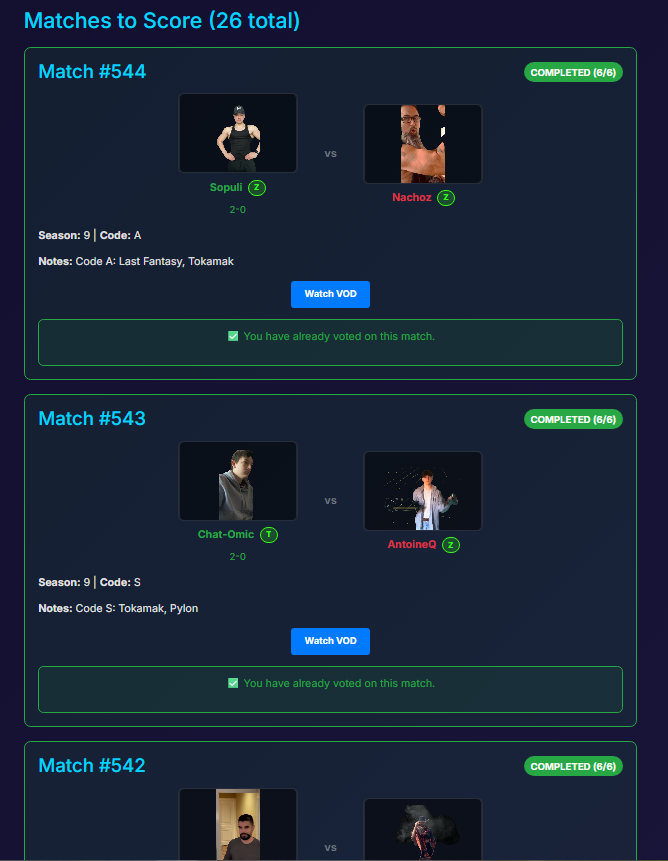
Click on your unique URL to access the voting interface. You'll see a list of matches available for voting.
- Single Match Mode: Focus on one match at a time with auto-advance
- Radio Button Selection: Easy-to-use radio buttons instead of dropdowns
- Progress Tracking: See which matches you've completed
- Match Details: Click player names to view profiles and match information
- Player Intros: Watch player introduction videos for context
Choose a match you want to review. Each match will show:
- Player names and races
- Match details and VOD link
- Voting progress (if you've already voted)
4. The Voting Process
Step-by-Step Voting
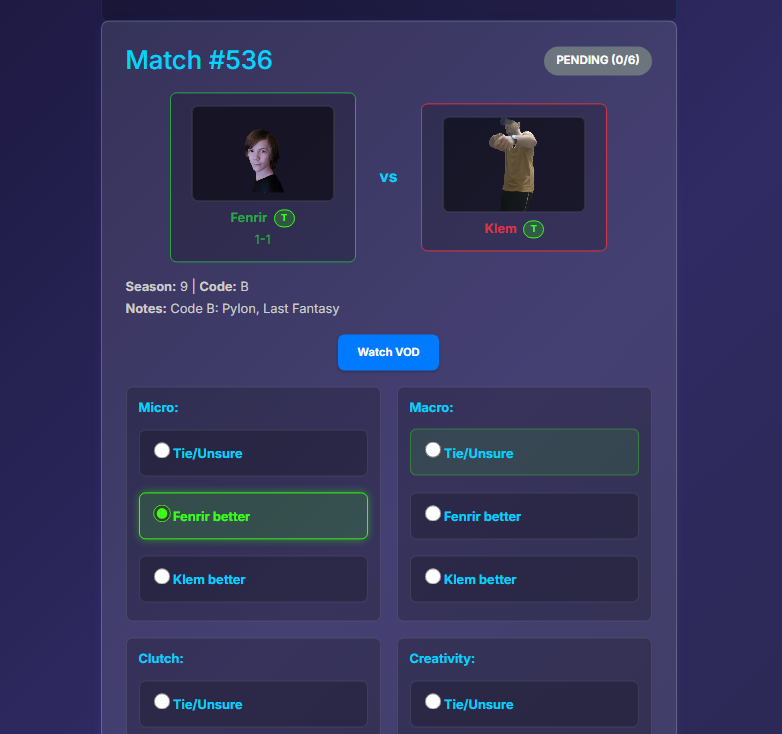
Click on the VOD link to watch the full match. Take notes on player performance across all six attributes.
After watching the match, return to the voting interface and click "Vote on This Match" for the selected match.
For each of the six attributes, select one of three options:
- 0 = Tie: Both players performed equally well in this attribute
- 1 = Player 1: Player 1 performed better in this attribute
- 2 = Player 2: Player 2 performed better in this attribute
Review all six attribute scores and click "Submit Votes" to save your assessment.
5. Understanding Attributes
The FSL Spider Chart System evaluates players across six core attributes that capture different aspects of StarCraft II gameplay:
Micro
Definition: Fine unit control in combat situations
Examples:
- Marine splitting against banelings
- Spell usage (EMP, storm, fungal)
- Unit positioning and kiting
- Worker micro during harassment
Macro
Definition: Resource management and production efficiency
Examples:
- Worker production and saturation
- Base expansion timing
- Supply management
- Production queue management
Clutch
Definition: Performance under pressure and in pivotal moments
Examples:
- Game-winning decisions
- Performance when behind
- Critical engagement execution
- Comeback scenarios
Creativity
Definition: Off-meta builds and unexpected strategies
Examples:
- Unconventional build orders
- Surprise unit compositions
- Innovative timing attacks
- Creative map-specific strategies
Aggression
Definition: Proactive attacking style and constant pressure
Examples:
- Early game harassment
- Constant map presence
- Multi-pronged attacks
- Denying opponent expansions
Strategy
Definition: Build order planning and adaptation
Examples:
- Build order selection
- Scouting and adaptation
- Tech path decisions
- Map-specific strategies
6. Scoring System
Voting Scale
For each attribute, you must choose one of three options:
Score Calculation
Your votes are processed through the following system:
- Raw Votes: Your 0/1/2 votes are collected
- Weighted Calculation: Votes are multiplied by your reviewer weight
- Aggregation: All reviewer votes for a player are combined
- Normalization: Final scores are converted to a 5-10 scale using the formula: (original_score / 2) + 5
If you vote "1" (Player 1 better) for Micro with a weight of 1.5, your contribution to Player 1's Micro score would be 1.5 points. After aggregation and normalization, this becomes part of the final 5-10 scale score.
Final Spider Chart
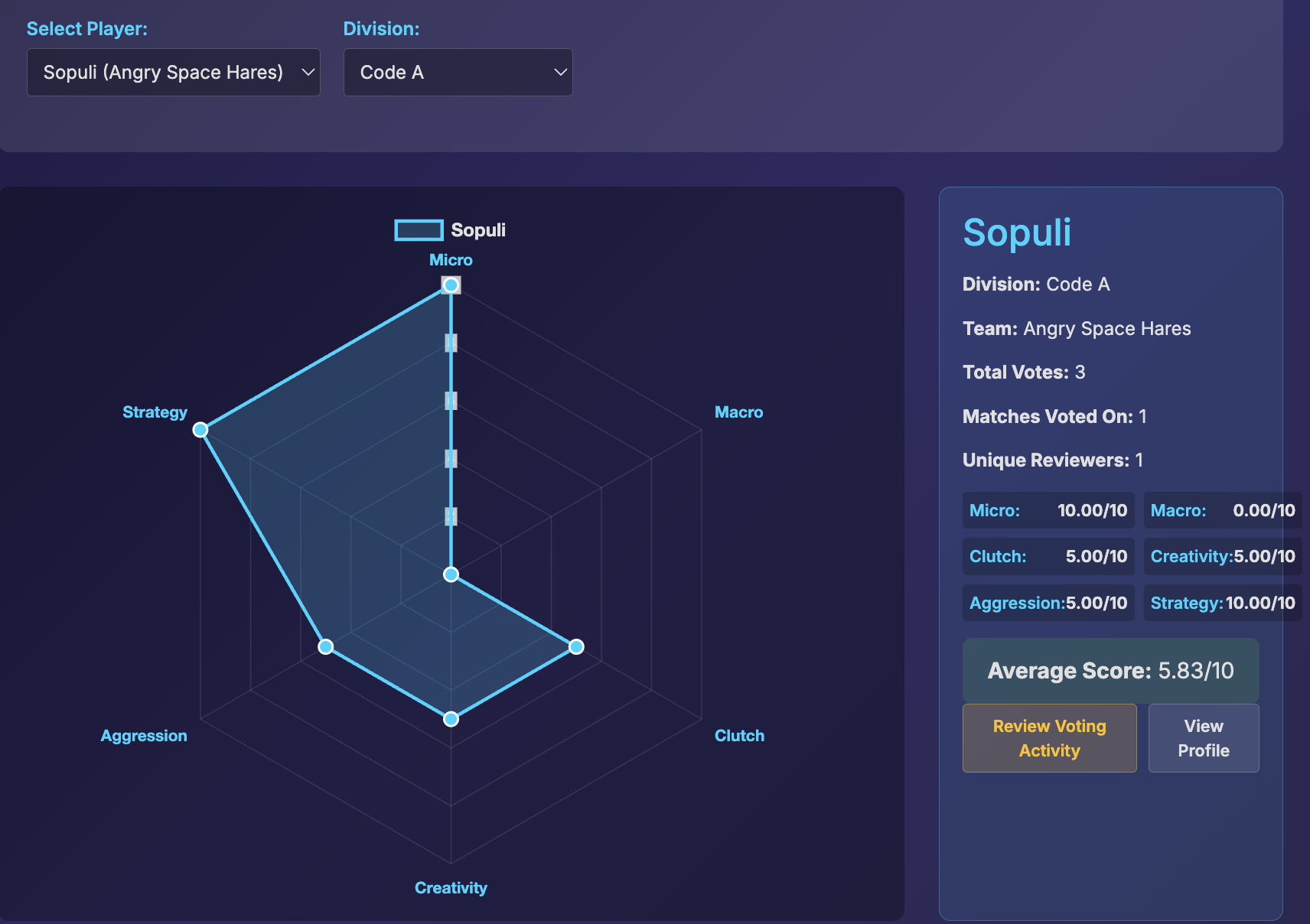
The final spider chart shows each player's scores across all six attributes on a 5-10 scale, creating a visual representation of their strengths and weaknesses. The 5-10 scale ensures that no player receives a score of 0, providing a more balanced and meaningful comparison.
Understanding Your Scores - Common Misconceptions
Many players misunderstand what their spider chart scores represent. Here's a common example:
A: You got 10/10 macro because reviewers watched your games and said "Player A's macro was better than Player B's macro." That's it. You didn't demonstrate perfect macro - you just had better macro than your opponent in those specific games.
10/10 = "You win 100% of your macro comparisons" (not "You have perfect macro")
This could be based on:
- 1 reviewer comparing you vs 1 opponent in 1 game
- 4 reviewers comparing you vs 1 opponent in 1 game
- Multiple reviewers across multiple games
Viewing Your Spider Chart
You can view your spider chart and compare with other players using our public spider chart viewer:
Visit the "Spider Charts" link in the main FSL menu to access the public spider chart viewer. This tool allows anyone to:
- Search for any player by name (autocomplete after 3 characters)
- View individual player spider charts with detailed statistics
- See voting data including total votes, matches voted on, and unique reviewers
- Compare players across different divisions
- Browse top players by division rankings
- Access full player profiles and match details
No login required! The spider chart viewer is completely public and accessible to everyone.
7. Voting Examples
Example 1: Balanced Match
Scenario: A close macro game where both players show similar skill levels
Example 2: One-Sided Match
Scenario: Player 1 dominates with superior micro and strategy
8. Best Practices
Before Voting
- Watch the Full Match: Don't vote based on highlights or partial viewing
- Take Notes: Jot down key moments for each attribute
- Consider Context: Account for match-up, map, and game state
- Be Objective: Focus on performance, not personal preferences
During Voting
- Evaluate Each Attribute Independently: Don't let one attribute influence others
- Use the Full Scale: Don't default to ties - make clear distinctions
- Consider the Match as a Whole: Look at overall performance patterns
- Be Consistent: Apply the same standards across all matches
Common Mistakes to Avoid
- Voting Based on Results: Don't just vote for the winner
- Ignoring Context: Consider the match-up and map
- Rushing: Take time to properly evaluate each attribute
- Bias: Avoid favoritism toward specific players or playstyles
Quality Assurance
- Review Your Votes: Double-check before submitting
- Be Honest: If you're unsure about an attribute, consider it a tie
- Stay Consistent: Apply the same evaluation criteria
- Focus on Performance: Evaluate what happened, not what could have happened
9. Troubleshooting
Common Issues
Solution: Contact an administrator to verify your token is active and correct.
Solution: Make sure you're using the complete URL including the token parameter.
Solution: You've already voted on those attributes for this match. You can only vote once per attribute per match.
Solution: Each reviewer can only vote once per match. Check if you've already submitted votes for this match.
Solution: Contact an administrator to verify the VOD link is correct and accessible.
Getting Help
If you encounter any issues not covered above:
- Contact the FSL administration team
- Provide your reviewer token and the specific error message
- Include screenshots if possible
- Describe what you were trying to do when the issue occurred
For technical issues with the voting system, please contact the system administrator with your reviewer token and a detailed description of the problem.
Conclusion
The FSL Player Attributes Voting System provides a comprehensive and fair way to evaluate player performance across multiple dimensions of StarCraft II gameplay. By following this guide and applying consistent evaluation criteria, you'll contribute to creating accurate and meaningful spider charts that help players understand their strengths and areas for improvement.
Explore the Results
Once voting is complete and scores are aggregated, you can explore the results using our public spider chart viewer:
- Player Search: Find any player with autocomplete search
- Interactive Charts: View detailed spider charts for each player
- Division Rankings: See top players by division
- Voting Statistics: View total votes, matches, and reviewer counts
- Player Profiles: Access full player information and match details
Access: Click "Spider Charts" in the main FSL menu - no login required!
Thank you for contributing to the FSL community!
FSL Player Attributes Voting Guide
Version 2.0 | Last Updated: January 2025
New in Version 2.0: Updated to 5-10 scoring scale and added public spider chart viewer
Franchise Star League - Spider Chart Review System